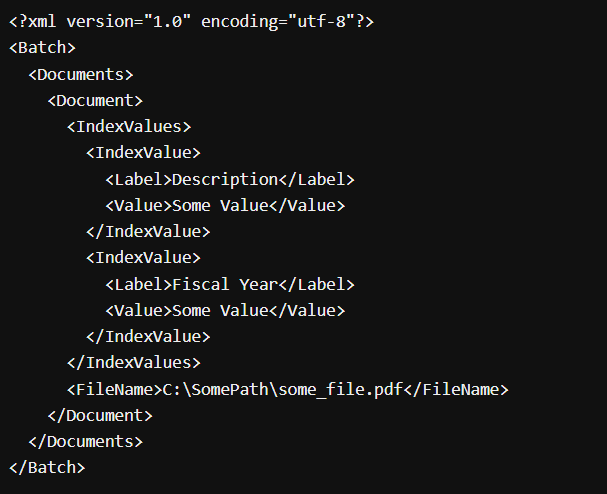
XML Uploads
Some document scanners create an XML file with a list of scanned documents.
ExpressLink can parse these XML files and upload the listed documents to 1DocStop.
If the XML file contains metadata for the files to upload, ExpressLink can add the meta data to 1DocStop as well.
XML Mismatch
If the meta data doesn't match the expected format it will give the user a couple of options before doing the upload.
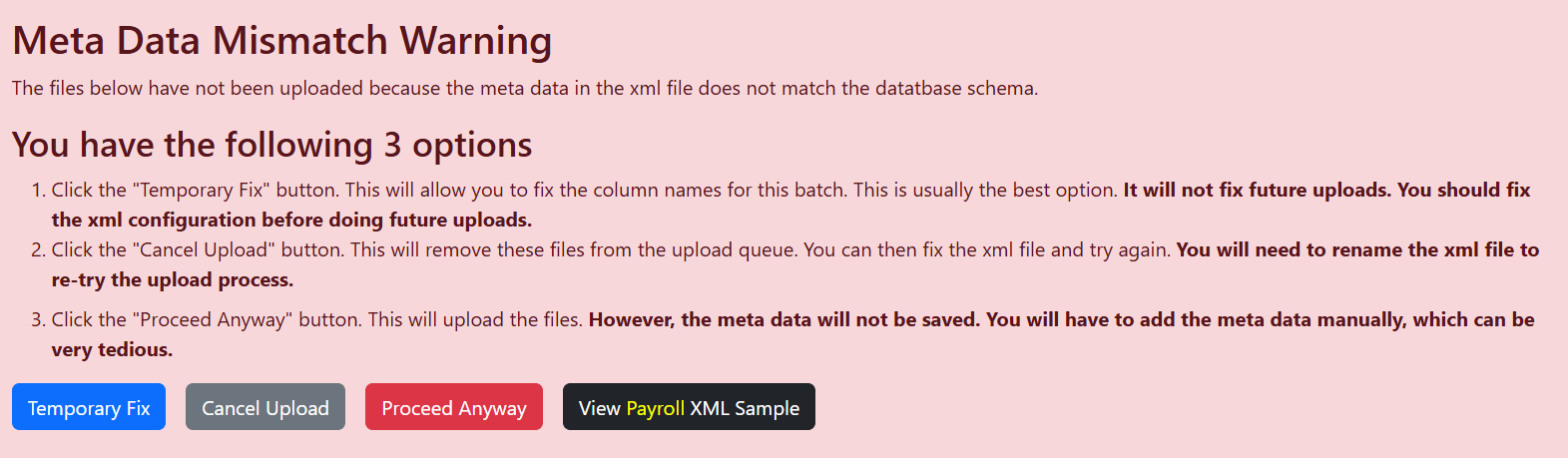
Temporary Fix
One common cause for the XML mismatch error is when the meta data column names are misspelled in your XML file or in the 1DocStop database.
If you choose Temporary Fix, you can match the columns in you XML document to the columns that ExpressLink is expecting for the library you are uploading to.

As the name implies, this is only a temporary fix. Updating column names only fixes the current set of uploads in the current XML document.
Cancel upload
Choose this option to cancel the current set of uploads, fix the problem and try again later. You will need to change the name of the xml file for the next attempt.
Proceed anyway
Choose this option to do the uploads. The meta data will not be added to 1DocStop for the files you are uploading, but you can add them manually in 1DocStop. Note: this can be a tedious process.
View <library name> XML Sample
Click this button to see a sample of what ExpressLink exects in an XML file for the library you are trying to upload to. You can compare this to your XML file to see if there are column spelling errors or extra or missing meta data columns.